
Fixing an Inconsistent Brand Identity
Fix an inconsistent brand identity by comparing each active brand element with one authoritative approved standard, correcting only confirmed mismatches, updating source or master assets before dependent uses, and verifying the repaired state before wider use. Keep approved variations when they are valid for their documented context.
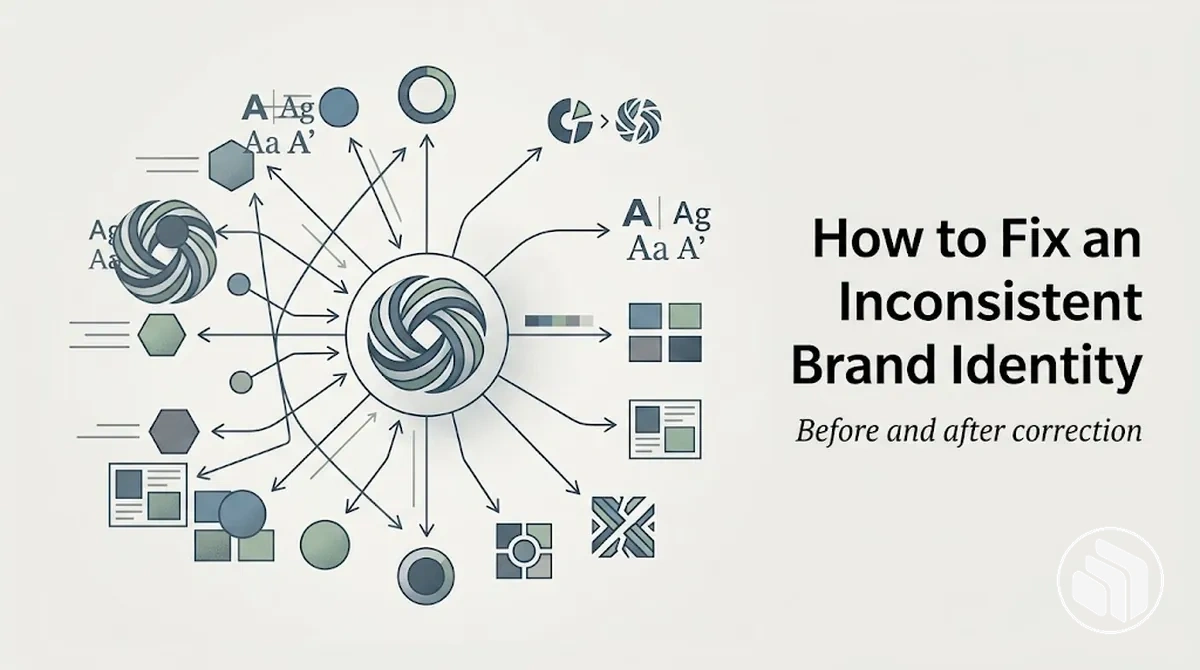
Brand identity correction path
Use the approved standard as the decision reference, then move from diagnosis to controlled replacement and verification.
- Confirm the reference.Identify the approved source, specification, or documented rule. If authority is unresolved, keep the comparison provisional until approval is confirmed.
- Classify the difference.Retain a documented approved variation; correct or retire an obsolete, altered, or unauthorised version; verify any version whose status is still unclear.
- Prioritise by impact and propagation.Correct mismatches earlier when they affect recognition or coherence, recur frequently, have broad exposure, or can spread through dependent assets.
- Correct the source first.Repair the master or source asset before updating templates and other dependent materials so the corrected state becomes the reusable reference.
- Verify before wider use.Pass an asset when it matches the approved state or a documented exception; rework it when an unresolved mismatch remains.
Decision rule: visual difference alone does not prove inconsistency; approval status, intended use, and rule fidelity determine whether a difference should remain or be corrected.
The goal is to restore a common reference across the logo, colour, typography, imagery, voice, and messaging; correction does not automatically require redesigning the identity.
Visible variation is not automatically an inconsistency: an approved variation may differ from the primary asset and still be valid when its intended use and approval are documented, while an obsolete, altered, or unauthorised version may require correction.
The scope of correction depends on approval status, the documented standard, intended use, and which source assets feed downstream materials.
Table of Contents
Pinpoint the Mismatches That Need Correction
A brand identity mismatch is identified by comparing the current state of a brand asset with its expected state in an approved reference.
If no approved reference is available, use a provisionally trusted source and treat the comparison as provisional until its approval status is confirmed.
A diagnostic signal exists when observable use differs from that reference: a logo may use a conflicting version, a colour may fall outside the documented palette, typography may use an unapproved typeface, imagery or graphic treatment may depart from the specified treatment, or voice and messaging may conflict with the expected expression.
Each mismatch indicates something that requires checking; it does not by itself confirm why the discrepancy occurred.
The image illustrates how visible differences in representative assets can be marked as diagnostic signals without assigning a cause.

This local mismatch check is intentionally narrower than a comprehensive assessment; when the reference itself is uncertain or broader verification is required, audit your brand identity before treating the discrepancy as confirmed.
Corrective priority remains qualitative here and identifies which confirmed mismatches warrant earlier correction without assigning an unsupported numerical score.
| Brand element | Current state | Expected state | Mismatch | Corrective priority |
|---|---|---|---|---|
| Logo | Outdated or conflicting logo file is in use | Approved logo version specified by the reference | Current logo differs from the referenced version | Earlier correction when the conflicting version is clearly observable or reused across dependent assets |
| Colour | Off-palette colour is applied to a brand asset | Colour specified by the approved reference | Observed colour differs from the documented specification | Earlier correction when the deviation is repeated or affects prominent identity elements |
| Typography | Unapproved typeface or treatment is used | Approved typeface and treatment for the intended use | Typography differs from the referenced specification | Earlier correction when the conflicting typography is recurring or prominent |
| Imagery | Image treatment conflicts with the referenced visual direction | Approved imagery treatment for the intended context | Observed imagery does not match the referenced treatment | Earlier correction when the discrepancy is prominent or repeatedly reproduced |
| Graphic treatment | Shapes, layouts, or supporting graphics use a conflicting treatment | Approved graphic treatment documented by the reference | Current treatment deviates from the referenced specification | Earlier correction when the deviation affects recurring or dependent brand assets |
| Voice | Tone conflicts with the expected expression | Voice specified for the relevant context | Observed tone differs from the referenced voice | Earlier correction when the conflicting voice appears in prominent or repeated communication |
| Messaging | Core wording or message emphasis conflicts with the reference | Approved messaging for the intended use | Current messaging differs from the referenced message state | Earlier correction when the discrepancy changes a prominent or repeatedly communicated message |
Separate Approved Variations from Outdated or Altered Versions
An approved variation and an outdated or altered version can look different from the primary brand asset, but they require different interpretations.
An approved variation is legitimate when its approval status and intended use are documented, while an outdated version or altered version requires checking against the applicable documented rules rather than being classified by appearance or chronology alone.
Approval status, intended use, version status, and fidelity to documented rules determine the distinction.
For example, an approved alternate logo lockup can be valid for its specified context, whereas a stretched or recoloured logo deviates from the documented treatment when that alteration is not authorised.
The image makes this difference visible without treating every variation as an inconsistency.
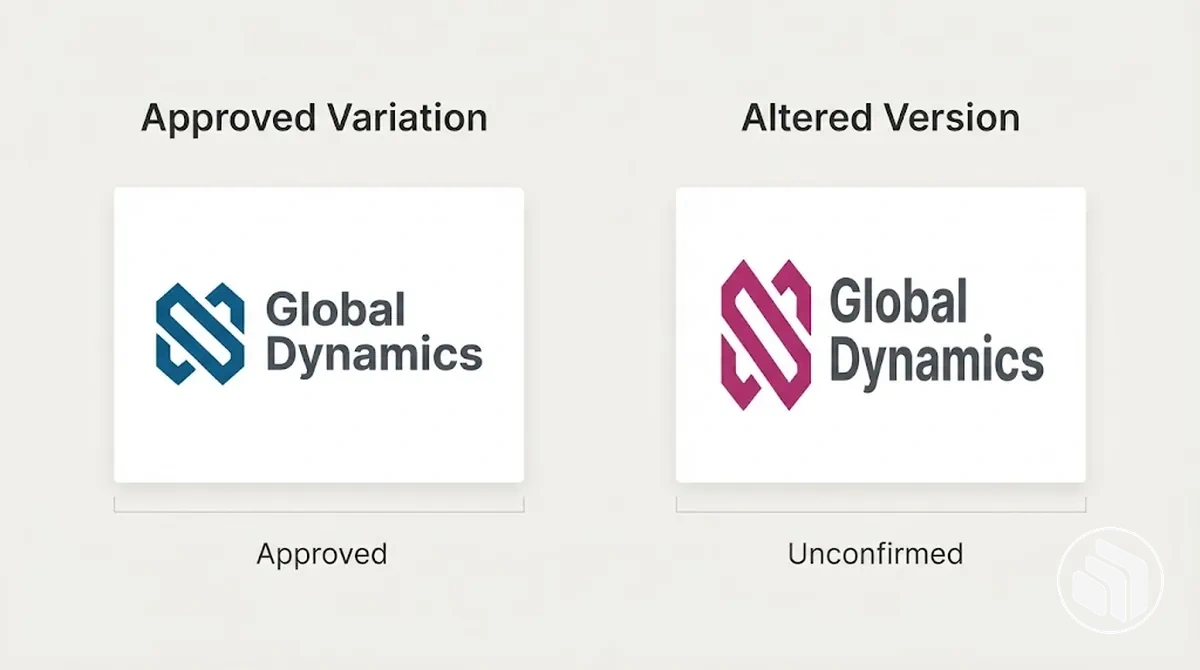
| Version state | Approval status | Intended use | Rule fidelity | Repair implication |
|---|---|---|---|---|
| Approved variation | Approved or documented as a legitimate variant | Defined for a particular context or application | Follows the documented rules that apply to that variant | Retain for its approved intended use |
| Outdated version | No longer approved, or approval status requires verification | Superseded use or no confirmed current use | May reflect an earlier valid state rather than the current documented rules | Retire when its obsolete status is confirmed; verify when provenance or current approval is unclear |
| Altered version | Unauthorised or approval status is unconfirmed | No documented intended use for the alteration | Deviates from applicable documented rules, such as logo proportion or colour treatment | Correct when the deviation is confirmed as unauthorised; verify first when approval evidence is incomplete |
Visual difference alone does not establish that a brand asset is wrong, and a newer or older file is not automatically the approved version.
Once an asset is classified as obsolete, altered, or unauthorised, its origin may help explain why brand identity becomes inconsistent, but that causal investigation is separate from deciding whether the variation itself is valid.
Prioritise Mismatches That Distort Recognition or Coherence
Mismatch priority should rise when an identified inconsistency more strongly affects recognition, coherence, reliable reuse, or propagation across dependent assets.
Higher-impact or higher-propagation mismatches normally warrant earlier correction, while a limited variation with low exposure may have lower corrective priority when its consequences remain contained.
The criteria below separate recognition and coherence impact from exposure and downstream reuse, so correction order reflects the conditions around each known mismatch rather than an arbitrary score.
The image illustrates how a source asset that can propagate into dependent assets may warrant earlier attention than an isolated variation.

What raises corrective priority
- Severity and recognition: Examine how strongly the mismatch changes a recognisable or coherence-defining brand element. A wrong primary logo warrants greater corrective priority when it materially changes the identity people are expected to recognise.
- Visibility and frequency: Check how prominently and repeatedly the mismatch appears in user-facing use. Repeated exposure can raise repair urgency, while a minor variation with limited exposure may warrant later correction when its consequences remain contained.
- Coherence: Assess whether the mismatch makes related brand assets appear inconsistent with the established identity. A recurring off-brand colour can warrant earlier correction when it affects a characteristic treatment across multiple uses rather than one isolated instance.
- Propagation risk: Determine whether the mismatch sits in a source asset, template, or other reusable material that can propagate through downstream reuse. A high-propagation mismatch may deserve earlier correction even when its immediate visibility is limited.
- Dependent assets: Identify whether other assets rely on the mismatched source. Priority rises when correcting the source prevents the same discrepancy from continuing through dependent assets.
Exposure and downstream dependence can matter more than cosmetic visibility alone because a source mismatch may spread through reuse even when its current exposure is limited.
For example, a wrong primary logo or recurring off-brand colour normally warrants attention before a minor low-exposure variation when it has greater recognition, coherence, frequency, or propagation implications.
Corrective priority is therefore relative to the observed conditions and available evidence rather than a fixed numeric score.
Establish the Reference Standard for the Brand Identity
The reference standard is the authoritative state used to judge whether conflicting brand assets should be accepted, corrected, or retired.
This approved standard must function as a trusted source of truth with identifiable approval status; otherwise, correction can remain unreliable when competing versions claim authority.
The reference standard should connect each identity element to an approved specification or trusted source: approved source files establish the authorised logo state, documented colour values define the accepted palette, typography rules define permitted type treatments, imagery direction defines the intended visual treatment, and voice and messaging rules define the approved communication state.
Approval status and version ownership then establish which specification is authoritative when conflicting versions exist.
The diagram shows these identity elements inheriting their accepted state from one controlled reference.
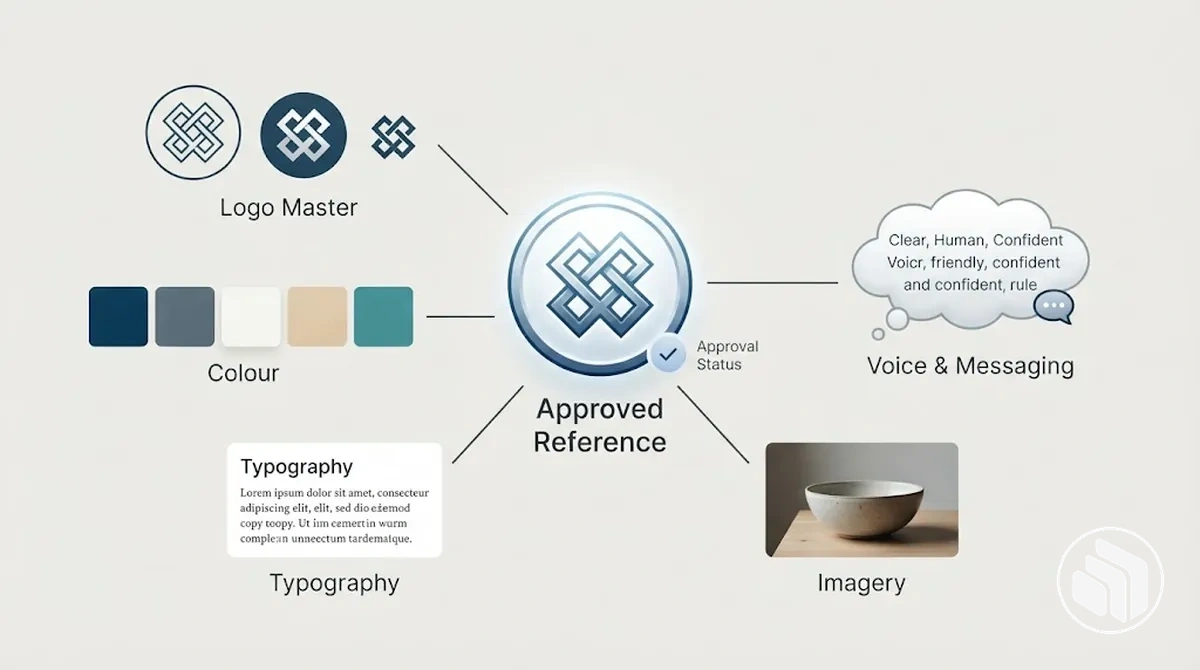
What the reference standard must define
- Approved source files: Identify the authorised logo masters and other primary identity assets. Their confirmed approval status supports the decision to accept matching assets and correct or retire conflicting versions.
- Colour values: Use the approved colour specifications for the relevant application as the acceptance criterion. A conflicting colour requires correction when it falls outside the approved state for that use.
- Typography rules: Establish the approved typefaces, styles, and permitted treatments for the relevant context. These rules determine whether a typography treatment is authorised or requires correction.
- Imagery direction: Define the approved visual characteristics that govern imagery for the relevant use. Assets that conflict with that direction require correction or review according to their approval status.
- Voice and messaging: Use approved wording, voice, messaging, or communication rules where they exist. These references determine whether a communication is consistent with the intended brand expression or requires revision.
- Approval and version ownership: Identify the approved authority or controlled source that establishes the current reference state and which version carries that status. This prevents prevalence, recency, or repeated use from being mistaken for authority.
When no reliable approved standard exists, a provisional reference can organise unresolved versions, but do not normalise conflicting assets until the reference authority is confirmed.
Organisational confirmation must resolve the reference decision before conflicting versions are normalised; documenting that resolved state more comprehensively belongs in the neighbouring task of building brand guidelines.
Resolve Conflicting Versions Against the Approved Brand Standard
A conflicting version occurs when two or more plausible brand assets claim the same role but do not match each other.
Resolve the conflict by checking each candidate against documented provenance, approval, and the applicable specification rather than treating appearance, recency, or frequency of use as evidence of validity.
Resolve competing versions against documented approval and specification evidence: check the source history, compare each candidate with the approved standard, and identify any deviation before selecting the valid version.
The comparison image illustrates this evidence-based relationship between candidate assets, the approved reference, and the resulting retain, correction, or retirement status.

Resolution sequence
- Confirm provenance or approval: Check the provenance, source history, or documented approval associated with each conflicting version. If that evidence is incomplete or contradictory, keep the version status unresolved until the relevant approval can be confirmed rather than relying on one metadata field.
- Compare the specification: Compare each competing file with the applicable approved specification, such as the authorised logo construction or colour specification. The purpose is to establish which candidate conforms to the documented reference rather than which one looks preferable.
- Identify the deviation: Record where each conflicting version differs from the approved specification. For example, if two plausible logo files have different histories, a difference in proportions or colour treatment becomes decision-relevant only when the approved reference specifies which treatment is authorised.
- Select the valid version: Retain the candidate whose approval evidence and specification fit establish it as the valid version for the relevant use. A newer or more frequently used candidate does not take precedence when those signals conflict with documented approval.
- Mark alternatives for correction or retirement: Assign each remaining conflicting version an evidence-supported status: correct it when an authorised asset contains a remediable deviation, or mark it for retirement when documented evidence establishes that it is obsolete or unauthorised. Do not treat uncertain provenance as grounds for automatic retirement.
Correct the Core Brand Elements to the Same Standard
Correct each core brand element from the approved reference, starting with the source asset or master asset that propagates into dependent material.
Correct source or master assets before downstream assets so the approved state becomes the version used for subsequent replacement rather than allowing the same inconsistency to continue through reuse.
A master asset can feed multiple downstream uses, so its inconsistent state can be carried into dependent material whenever that source is reused.
For example, if a shared logo master contains the identified mismatch, correcting that master first gives dependent materials a corrected version to use when they are replaced; the exact dependency can vary by organisation, asset type, or production workflow.

Correction sequence
- Confirm the approved reference: Confirm the approved state that applies to the core brand element before making a correction. Complete this step when the source asset can be checked against an identifiable approved reference rather than an assumed or merely prevalent version.
- Correct high-priority source or master assets: Correct the relevant source asset so its logo, colour, typography, imagery, or messaging state matches the approved reference. Complete this step when the corrected master asset has been checked against that approved state.
- Propagate corrected assets to dependent materials: Replace the inconsistent source in dependent material with the corrected version wherever that dependency is known. Complete this step when the identified downstream assets that inherit the source use the corrected asset rather than the conflicting version.
- Verify the corrected state: Check the corrected source asset and the affected dependent material against the approved reference after replacement. Complete the local repair when the targeted element matches the approved state in the corrected assets and no identified dependency still uses the version being corrected.
Verification is the final local action before wider replacement is treated as complete: compare the corrected state with the approved reference and check the affected dependency for the version that should now be in use.
Where the dependency between a master asset and downstream material is uncertain, verify that relationship before assuming which materials require replacement.
Standardise Logo Variants and Usage
Standardize each logo variant by replacing an obsolete mark or altered version with the approved logo for its intended context.
Start with the master file, then check that the approved variant retains the required proportions and colour treatment.
Logo checks
- Master file: Use the approved master file as the source for the logo version being corrected rather than reproducing an obsolete mark from an existing asset.
- Approved variant: Confirm that the selected approved variant is authorised for the intended context. Preserve a documented alternate lockup when that lockup is the approved form for that use.
- Proportions: Check the logo against the proportions of its approved variant. Correct a stretched, compressed, or otherwise altered version when it does not conform to the approved mark.
- Colour treatment: Check that the logo uses the approved colour treatment for its intended context. Do not invent a colour specification when the applicable treatment is undocumented; confirm the required version instead.
- Context-appropriate use: Verify that the logo variant matches the context for which it is approved. An alternate lockup or format can remain valid when its use is documented rather than being treated as an inconsistency merely because it differs from the primary logo.
A legitimate alternate lockup does not need correction simply because its arrangement differs from the primary mark, while an obsolete mark or unauthorised alteration should be replaced when the approved version is established.
For example, a legacy logo used in a current asset can be replaced with the approved file for that intended context, then the corrected logo file should be verified against the approved variant for proportions, colour treatment, and intended use.
Align Colours and Typography with the Reference Standard
Align colour and typography by comparing each current colour value, palette role, font family, font weight, and typographic hierarchy with the approved specification.
Correct elements that differ from the documented reference while preserving valid roles and treatments that already match their intended use.
A genuine specification mismatch requires correction, but a context-dependent rendering variation does not automatically represent an inconsistent state.
For example, a legacy colour value or substituted font should be replaced when it conflicts with the approved specification, while a technical rendering difference should be verified against the intended platform or environment before being treated as a branding error.
| Element | Approved specification | Inconsistent state | Correction |
|---|---|---|---|
| Colour value | The documented colour value assigned to the relevant palette role | A legacy or altered colour value is used for that role | Replace the inconsistent value with the approved colour value for the same palette role |
| Palette role | The approved role assigned to a colour within the identity system | A valid colour is applied in a role for which it is not approved | Restore the approved colour-to-role relationship for the intended context |
| Font family | The documented font family specified for the relevant use | A substituted or unapproved font family appears where the approved family is required | Replace the substitution with the approved font family when that family is required and available in the intended environment |
| Font weight or style | The approved font weight or style for the relevant text function | The text uses a weight or style that differs from the documented specification | Restore the specified weight or style while keeping the intended text function unchanged |
| Typographic hierarchy | The documented relationship between text roles, such as heading and body treatments | Text roles use treatments that conflict with the approved hierarchy | Restore the approved treatment for each role so the hierarchy matches the reference state |
Verification should confirm that each corrected colour and typography element now matches its approved specification for the intended context.
Where device, platform, font availability, or rendering conditions create a visible difference without changing the documented colour or type specification, treat that difference as a technical variation unless the reference standard establishes that correction is required.
Reconcile Imagery and Graphic Treatment
Correct imagery and graphic treatment when the current visual treatment materially deviates from the approved imagery direction or documented graphic conventions.
Compare each high-signal visual attribute with its approved state, then apply the correction needed to restore alignment without forcing legitimate creative variation into a single identical treatment.
Visual attributes to reconcile
- Photographic treatment: Check whether lighting, tone, composition, or other documented photographic treatment aligns with the approved imagery direction. Adjust assets that materially deviate from the approved state while preserving variations that remain within the accepted treatment.
- Illustration style: Compare the current illustration style with the documented visual convention. Correct incompatible line work, rendering, or stylistic treatment when it deviates from the approved state for that identity system.
- Icon style: Check characteristics such as stroke treatment, fill style, or visual weight against the approved icon style. For example, an icon with a visibly heavier treatment than the documented icon set should be corrected when that difference conflicts with the established convention.
- Recurring shapes and patterns: Verify that recurring shapes, patterns, or graphic devices follow the approved convention for their intended use. Adjust treatments that conflict with the documented form while preserving approved variations within the same graphic system.
- Cropping and image framing: Compare cropping and framing with the approved imagery direction where those conventions are documented. Correct crops that materially deviate from the intended treatment rather than assuming every compositional difference is inconsistent.
Creative variation can remain valid when it preserves the recognisable conventions of the approved visual direction; correction is required when a treatment materially deviates from those conventions.
Where a photographic treatment, illustration style, icon style, recurring shape, pattern, or cropping convention is undocumented, confirm the intended approved state before correcting the difference.
Align Voice and Messaging Where They Conflict
Correct brand voice and messaging when their core characteristics, terminology, or message priority conflict with the approved brand expression.
Align each communication attribute with the documented rule for its context, then replace the conflicting expression with approved wording or an expression that preserves the same communication rule.
Communication attributes to align
- Brand voice: Check whether the communication style aligns with the documented brand voice characteristics. Correct wording that materially conflicts with those characteristics while preserving legitimate variation in sentence structure or phrasing.
- Tone: Evaluate tone in relation to its context, such as the channel, audience situation, or communication purpose. Preserve a context-appropriate tone variation when it remains within the approved brand voice, and correct it when the adaptation changes the underlying voice beyond the documented rule.
- Terminology: Compare recurring terms with approved terminology where such wording is documented. Replace outdated, inconsistent, or disallowed terminology with the approved wording rather than treating ordinary synonymous phrasing as automatically incorrect.
- Message priority: Check whether recurring communications preserve the documented message priority for the relevant context. Correct a conflicting expression when it changes or displaces a message that the approved communication rule identifies as primary.
- Outdated or disallowed phrasing: Replace phrasing that is explicitly obsolete or disallowed when that status is documented. Where no such rule exists, confirm the intended expression before classifying ordinary wording variation as an inconsistency.
A tone can adapt to context without changing the underlying brand voice; for example, a more concise service message may remain valid when it preserves approved terminology and message priority, while a message that introduces conflicting terminology or reverses an approved priority requires correction.
Verify the corrected expression against the documented voice, tone condition, terminology, approved wording, and messaging rule that apply to that context.
Replace Outdated Assets and Centralise Approved Versions
Replace each outdated asset in active use with the approved brand asset, and keep approved masters in one controlled location where their version status and approval source are clear.
The immediate objective is to deprecate obsolete versions, update active source files and templates, and make the approved version easy to identify during the repair period.
Asset replacement workflow
- Mark obsolete assets as deprecated: Identify each outdated asset that has already been superseded and assign a clear deprecated version status without presenting it as an approved master. Complete this step when the obsolete asset cannot reasonably be mistaken for the current approved version and its superseding approval source is identifiable.
- Replace obsolete versions in active sources and templates: Update each known active source file, template, or reusable material that still contains the deprecated asset. Complete this step when the identified active sources contain or point to the approved replacement rather than the obsolete version.
- Consolidate approved masters in one controlled location: Place the approved master assets in the controlled location used for the repair workflow and associate each with its relevant approval source. Complete this step when active users and reusable source files point to a clearly identifiable central source for the approved versions rather than competing locations of uncertain status.
- Apply clear version and status labels: Label approved, deprecated, and replacement states clearly enough to distinguish which asset should remain in active use. Complete this step when the status of each retained or deprecated asset is unambiguous and the approved master can be identified without relying on recency, filename familiarity, or repeated use alone.
The cleanup is complete for the immediate repair when active users, active source files, and reusable templates point to clearly identified approved versions and outdated assets are no longer presented as active choices.
Centralisation supports that condition by giving approved masters a controlled source and visible version status, but its implementation should follow the organisation's actual storage and approval workflow rather than assuming a particular software system.
Verify the Corrected Identity Before Wider Use
Verify the corrected brand identity against the approved standard before repaired assets enter wider use.
Each verification point should compare the expected state with the observed corrected state and produce one of two outcomes: pass when the element conforms, or rework when an unresolved mismatch remains.
Verification decision
- Pass
- The corrected element matches the approved state, or a documented exception explicitly permits the variation in that context.
- Rework
- An unresolved deviation remains outside the approved condition.
- Scope
- Spot checks confirm only the assets examined; they do not prove that every future use across every channel will remain consistent.
Pass / rework checks
- Approved logo variants: Expected state: each corrected logo uses an approved variant for its intended context. Pass when the observed corrected state matches that approved variant, including any documented alternate lockup; rework when an obsolete, altered, or context-inappropriate version remains active.
- Colour values: Expected state: corrected colour values and palette roles match the approved standard for their intended use. Pass when the observed values and roles conform; rework when a legacy, altered, or incorrectly assigned colour remains.
- Typography: Expected state: the corrected font family, font weight or style, and typographic hierarchy match the approved specification for the relevant context. Pass when the observed corrected state conforms or represents an approved exception; rework when a conflicting substitution or hierarchy remains.
- Imagery and graphic treatment: Expected state: photographic treatment, illustration style, icon style, recurring shapes or patterns, and cropping follow the approved visual direction where those conventions are documented. Pass when the corrected treatment conforms or is an approved exception; rework when a material deviation remains unresolved.
- Voice and messaging: Expected state: brand voice, context-appropriate tone, terminology, message priority, and approved wording align with the documented communication rules. Pass when the observed expression preserves those rules; rework when conflicting terminology, message priority, or disallowed phrasing remains.
- Outdated files: Expected state: deprecated assets are no longer presented as active choices in identified source files, templates, or controlled locations. Pass when active sources point to clearly identified approved versions; rework when an outdated file can still be mistaken for the current approved asset.
The corrected identity passes verification when the checked elements match their expected approved states or are documented approved exceptions; any unresolved mismatch requires rework before wider use.
Once the immediate repair is verified, the next boundary is maintaining brand consistency across channels as those approved assets are reused.