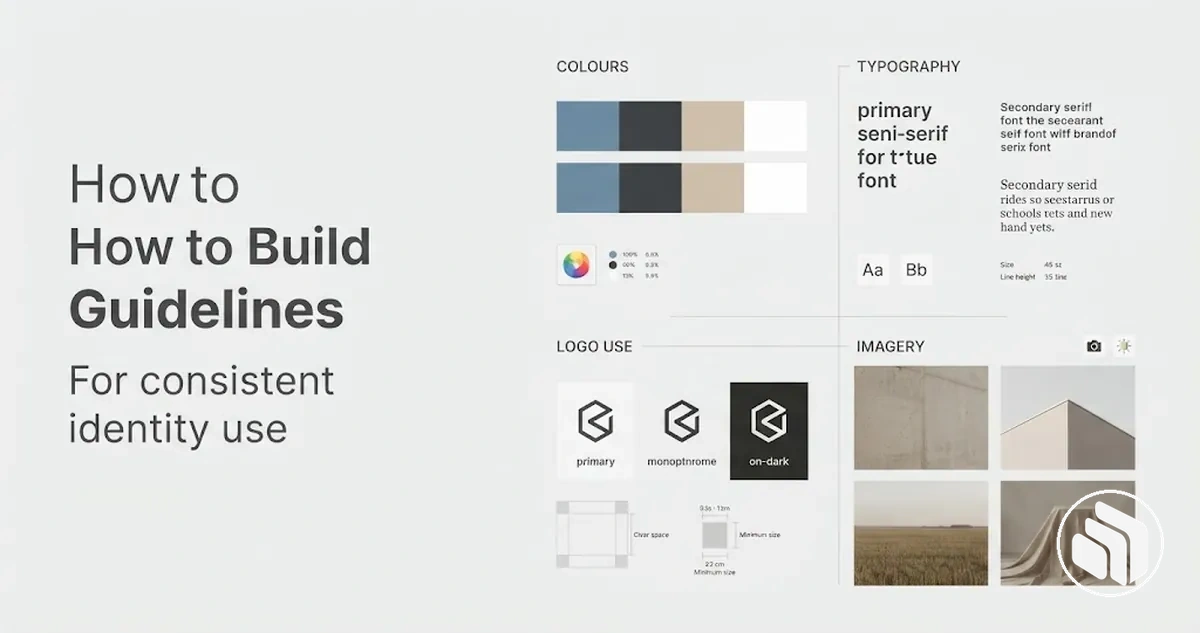
Building Brand Guidelines for Consistent Identity Use
Build brand guidelines by documenting an already-approved brand identity as specific usage rules: define each element’s approved value or state, the condition in which it applies, and what is required, allowed, or prohibited. Include examples and bounded exceptions, test whether another person can apply the rules correctly, and assign ownership and version control so the current guidance stays authoritative.
Brand guidelines build path
Use this sequence to turn an established identity into guidance that people can apply, verify, and maintain.
Confirm identity readiness. Approved purpose and audience context, plus the logo, colour, typography, imagery, and voice decisions, must be clear enough to document; unresolved identity choices go back for clarification.
Document each rule domain. Record the approved asset or behaviour, its value or state, the condition in which it applies, and any restriction or fallback.
Write operational rules. Connect the rule subject to its condition, required, allowed, or prohibited action, practical consequence, and verification method.
Test application. Use correct and incorrect examples plus representative materials to reveal missing conditions, unclear terminology, exceptions, or hard-to-find rules.
Govern the current version. Assign an owner and approval responsibility, record the version and approved changes, and distribute one identifiable authoritative copy.
Key boundary: unresolved identity decisions should be clarified before they are documented as authoritative usage rules.
Scope and detail should match the organisation’s teams, channels, application complexity, and governance needs; the document’s role is operational use, not redesign of the underlying brand identity.
Table of Contents⌄
Prepare the Brand Identity System Before Writing the Guidelines
Brand identity system readiness means the decisions that the guidelines will govern are sufficiently defined and internally coherent before documentation begins.
Guideline writing should document approved identity inputs while leaving unresolved decisions for clarification rather than turning uncertain choices into usage rules.
The prerequisites depend on the identity the organisation actually uses, but they commonly include a defined brand purpose and audience alongside an established logo set, colour system, typography system, imagery direction, and voice principles.
These inputs belong to the broader Brand Identity Design system; the narrower documentation task is to determine which decisions are ready to govern use and which remain unresolved.
The diagram and readiness checks below organise these prerequisites by whether each identity input is defined enough to document or still requires clarification.
Brand purpose and audience: ready to document when the intended purpose and audience are defined clearly enough to guide relevant usage decisions; still unresolved when teams are working from conflicting assumptions.
Logo set: ready to document when the approved logo versions and their intended roles are identified; still unresolved when competing versions have no agreed status.
Colour system: ready to document when approved colours and their intended roles are defined; still unresolved when colours are still being selected or their roles conflict.
Typography system: ready to document when approved type choices and their functional roles are defined; still unresolved when type choices or roles remain undecided.
Imagery direction: ready to document when the intended visual characteristics are defined well enough to distinguish suitable from unsuitable imagery; still unresolved when those characteristics remain contradictory or undefined.
Voice principles: ready to document when the intended communication characteristics are defined well enough to guide language choices; still unresolved when teams lack an agreed direction.
Identity coherence: ready to document when the approved identity decisions can operate together without producing contradictory usage rules; still unresolved when one approved decision conflicts with another.
For example, if two logo versions are both treated as the default for the same application, documenting both as the primary choice could create contradictory rules rather than resolve the underlying decision.
Verification should therefore confirm which identity inputs are defined enough to govern use and which require clarification before documentation begins.
Define the Core Sections of the Brand Guidelines
Brand guidelines organise several rule domains within one document so people can understand the brand context and apply the identity consistently.
The exact section composition can vary with the brand's complexity and scope, but each component should give users a clear place to find the decisions and rules relevant to their work.
The core components can be grouped by function, moving from contextual grounding to visual identity, verbal identity, and practical usage guidance.
The diagram groups these major information domains so their relationship within the guideline document is clear without implying a rigid page order.
Brand guidelines may cover strategic, verbal, visual, usage, and governance context, while a purely visual style guide can be narrower; the broader distinction is covered in brand guidelines versus style guide.
Brand purpose and context: establishes the identity context that helps users understand what the documented rules are intended to support.
Logo rules: organise approved logo usage so users can identify which logo forms and applications are appropriate under defined conditions.
Colour rules: organise the approved colour system and its usage so colour decisions can be applied consistently.
Typography rules: define how the approved typography system is used to support a recognisable and coherent visual identity.
Imagery: establishes the visual direction for selecting and using images so they align with the intended identity.
Brand voice: organises voice, tone, and messaging principles so verbal identity can be applied across relevant communications.
Usage guidance and examples: connect the documented identity rules to practical applications by showing how approved decisions should be interpreted in context.
Each component should help users locate the relevant rule domain and understand its practical function without requiring every guideline document to use an identical structure.
Detailed rules can then remain within their appropriate sections rather than being duplicated in the component overview.
Summarise Brand Purpose, Values, and Audience
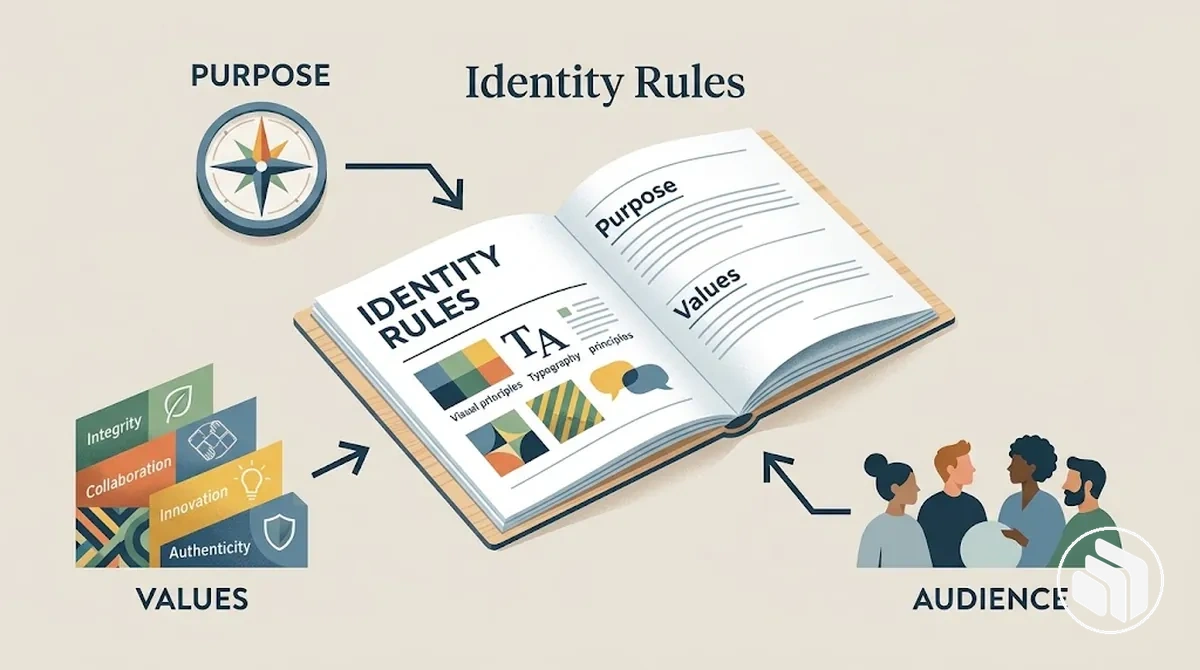
Brand purpose, brand values, and primary audience context give users a concise basis for understanding why the identity rules exist and whom the brand expression is intended to serve.
This context helps users interpret visual and verbal rules without reopening the broader strategy behind them.
The illustration shows how these three contextual inputs can inform the application of identity rules.
Brand purpose
Provides context for the role the identity is intended to express.
Brand values
Can influence tone, imagery, and other forms of brand expression when those relationships are explicitly defined. If accessibility is an explicitly stated brand value, it can support clearer, easier-to-read applications where the approved identity rules permit them.
Primary audience
Helps users interpret which applications and communication choices are relevant to the people the identity is designed to serve.
Keeping these connections explicit makes the strategic context useful for interpreting the guidelines rather than turning it into a separate strategy exercise.
Document Logo Usage Rules
Logo usage rules define the conditions for correct logo application rather than merely displaying the logo.
They should make the permitted logo variants and the conditions governing spacing, size, background, placement, colour treatment, and modification clear enough for users to distinguish approved use from incorrect use.
These conditions organise the practical checks used to judge whether a logo application follows the documented rules.
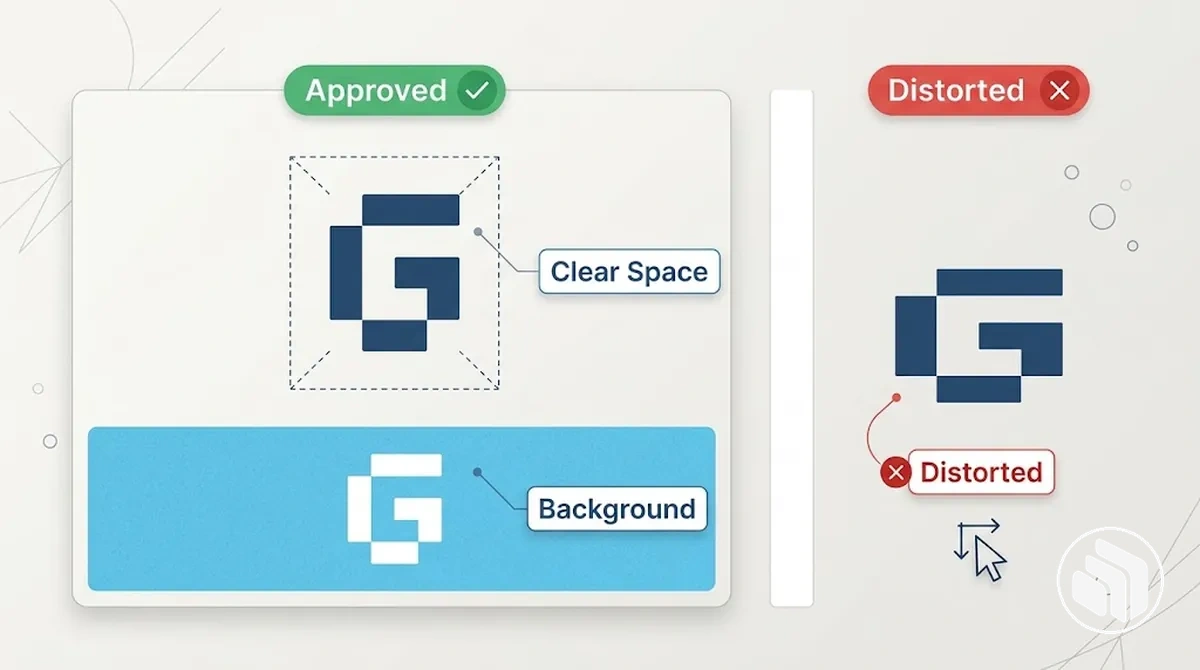
The annotated example shows how an approved variant, clear space, background treatment, and a prohibited alteration can be assessed visually.
Logo variants: use only the approved variant for the application condition defined in the guidelines; an unapproved variant is prohibited because it can create inconsistent logo use.
Clear space: maintain the brand-defined clear space, meaning the protected area around the logo, so nearby elements do not intrude into its required separation.
Minimum size: keep the logo at or above the minimum size specified by the brand for the relevant application; no universal minimum should be assumed when the guidelines do not specify one.
Background: use the logo on backgrounds that meet the brand's stated visibility and contrast conditions, selecting an approved alternative variant when the background requires it.
Placement: position the logo only where the documented placement conditions for that application are satisfied rather than assuming one position works in every context.
Colour treatment: apply only approved logo colours or treatments under the conditions defined for them; unauthorised recolouring is a prohibited alteration.
Prohibited alterations: prohibit changes such as distortion, rotation, or unauthorised modification when they change the approved logo form.
A correct application might preserve the specified clear space and approved proportions, while an incorrect version could compress the logo or allow another element to intrude into its protected area.
These criteria summarise how logo rules function within the broader document; detailed logo usage guidelines can define the brand-specific measurements, variants, and application conditions in greater depth.
Document Colour System Rules
Brand colour rules should document each approved colour role together with its approved values and the conditions under which those values apply.
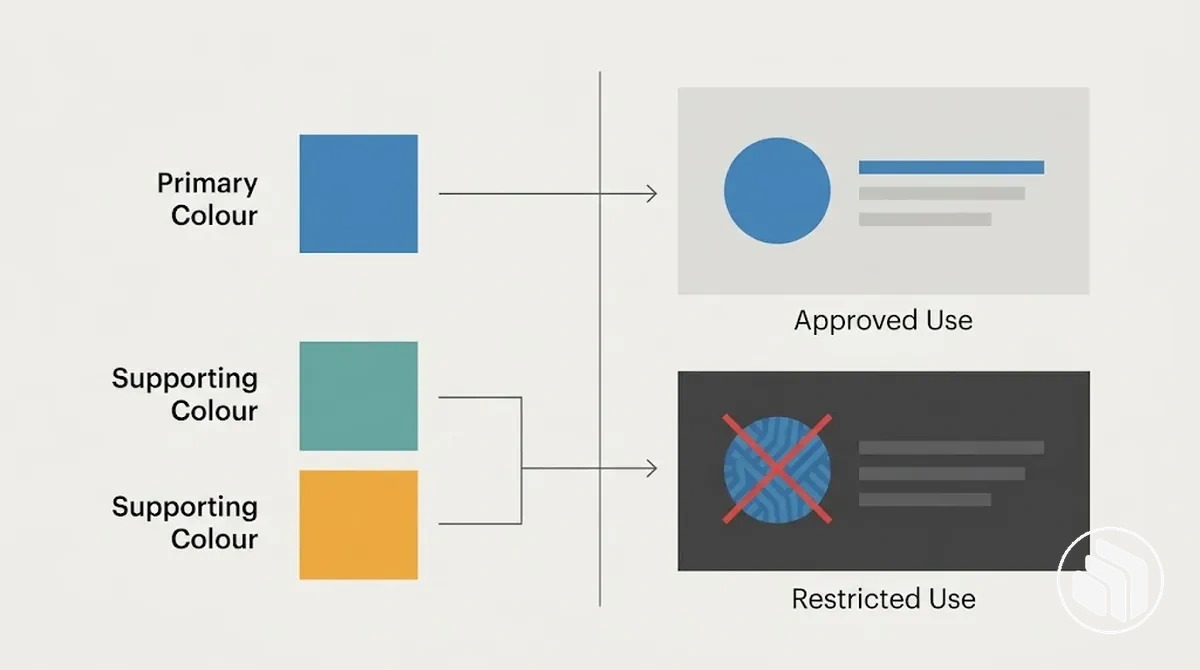
The colour system should distinguish the primary colour, supporting colour categories, relevant colour codes, and any background, contrast, or reproduction restrictions needed for consistent application.
The structured specifications below organise colour roles, approved values, usage conditions, and restrictions so users can retrieve the correct specification for the intended context.
Because actual colour codes belong to the established brand palette, they should be recorded from the approved source rather than inferred or substituted.
The annotated example shows how primary and supporting colour roles relate to permitted and restricted background contexts.
Colour Role
Approved Value
Usage Condition
Restriction
Primary colour
Record the approved colour codes for each specified reproduction medium
Apply in the contexts assigned to the primary colour
Do not substitute an unapproved colour or code
Supporting colour
Record the approved value for each defined supporting colour
Apply only in the supporting roles assigned within the colour system
Do not treat a supporting colour as interchangeable with the primary colour unless explicitly permitted
Background application
Use the approved colour specification for the relevant medium
Apply when the documented background and contrast conditions are satisfied
Use an approved alternative treatment when the specified background condition is not met
For example, an approved primary colour may have separate documented colour codes for digital and print reproduction, while its use on a particular background may also depend on the brand's specified contrast conditions.
Brand guidelines should record those approved specifications and conditions rather than create replacements; developing or revising the underlying brand colour system is a separate design task.
Document Typography System Rules
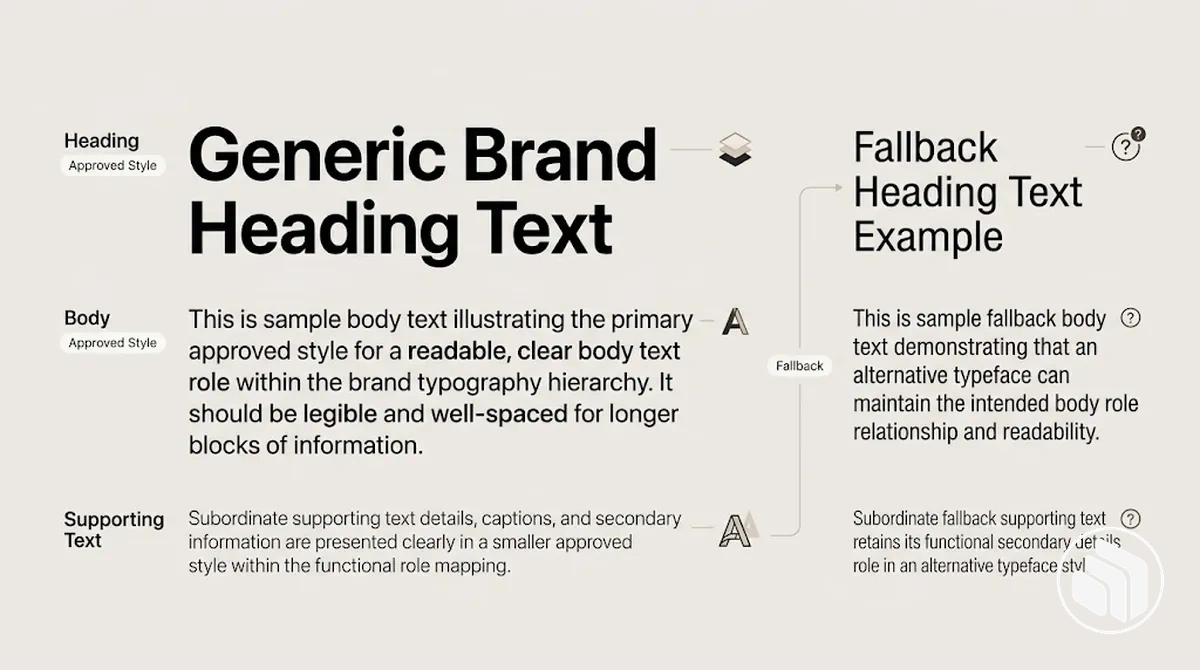
Brand typography rules map approved typefaces and styles to each functional text role so users can reproduce the intended hierarchy consistently.
The typography system should identify the permitted typeface or style for each role and define the usage conditions that govern its application.
The specifications below organise each text role by its approved typeface or style, usage condition, and fallback when the primary font is unavailable.
Where the brand defines weight, size range, or spacing, those settings should remain attached to the relevant role rather than treated as universal typography values.
The annotated example shows how approved type styles map to heading, body, and supporting text roles within one hierarchy.
Text Role
Typeface / Style
Usage Condition
Fallback
Heading
Record the approved heading typeface or style, including defined weight, size range, and spacing
Use for the heading levels or contexts assigned by the typography system
Use the documented fallback when the approved typeface is unavailable
Body text
Record the approved body typeface or style and its defined settings
Use for continuous text in the contexts assigned to the body role
Use the documented fallback while maintaining the intended distinction from heading text
Supporting text
Record the approved style and any defined weight, size range, or spacing for the supporting role
Use for supporting information only where that role is defined
Use the documented fallback while retaining its relationship to the primary hierarchy
For example, a correct application uses the documented heading and body styles in their assigned roles, while an inconsistent application may use the body style as a heading without that substitution being permitted.
Brand guidelines should document these approved role-to-style relationships and fallback conditions; constructing or revising the underlying brand typography system is a separate design task.
Document Imagery and Graphic Style Rules
Imagery and graphic style rules translate an established visual direction into observable criteria for selecting and treating visual assets.
They describe which characteristics of photography, illustration, icons, and graphic devices are acceptable within the imagery style so applications can remain recognisably connected to the same identity.
The relevant criteria depend on the established image direction and the asset type being used.
Documenting observable attributes makes subjective descriptors more useful because users can assess specific visual characteristics rather than relying on taste alone.
These criteria group the characteristics that determine whether an asset or treatment fits the documented direction.
Subject matter: describe the people, objects, environments, or situations that the photography or illustration permits or excludes, and connect those choices to the intended visual identity.
Composition: define observable framing, viewpoint, subject placement, use of space, or visual density where these characteristics are part of the established imagery style.
Lighting and photographic treatment: record the permitted lighting qualities and treatment characteristics, such as whether photography uses natural-looking or deliberately controlled visual conditions, without implying that one approach suits every brand.
Illustration style: describe observable characteristics such as shape treatment, line quality, level of detail, or dimensionality when these attributes distinguish acceptable illustration from an inconsistent treatment.
Icons: document the established icon treatment through characteristics such as line or filled construction, geometric consistency, corner treatment, and level of detail where those attributes are defined.
Graphic devices: identify the motifs, shapes, patterns, or other graphic elements that are permitted and specify the treatment conditions that keep them recognisable as part of the established system.
For example, if an established imagery direction describes photography as minimal, an acceptable state might use one clear subject, restrained visual clutter, and deliberate negative space, while a densely layered composition would not match those documented characteristics.
These rules record how the existing direction should be recognised and applied; developing or revising the underlying brand imagery style is a separate design task.
Document Brand Voice and Tone Rules
Brand voice and tone rules translate verbal identity into observable writing behaviours.
Brand voice
Remains anchored to stable traits expressed through vocabulary and sentence style.
Tone
Can vary with context, including the situation and appropriate degree of formality. Document which adjustments are permitted without changing the underlying brand voice.
Document the behavioural criteria that show how those stable traits and contextual shifts appear in language.
Vocabulary: define preferred word choices, terminology, and language patterns that express the brand voice, together with prohibited patterns that conflict with those traits.
Sentence style: describe observable features such as concise or extended sentence construction, direct or explanatory phrasing, and other structural patterns where they are part of the approved writing style.
Formality: specify the permitted degree of formality for relevant contexts, including when tone may become more formal or conversational without changing the underlying brand voice.
Personality traits: translate each approved trait into writing behaviour; for example, a trait defined as direct can require clear statements and restrained qualification rather than vague or indirect phrasing.
Prohibited patterns: identify language behaviours that contradict the defined voice, such as unsupported exaggeration, unnecessary jargon, or another pattern explicitly excluded by the guidelines.
Tone adjustments: describe how wording can change with context, such as becoming more reassuring in a support situation or more concise in an operational notice, while retaining the stable voice traits.
For example, if the defined brand voice is direct and respectful, a routine update might say, “Your request is ready for review,” while a sensitive delay could use the more considerate tone, “Your request is taking longer than expected, and we’ll update you when it is ready.” The situation changes the tone and level of reassurance, while the stable voice remains clear, respectful, and free of unnecessary exaggeration.
Turn Identity Decisions Into Unambiguous Usage Rules
An operational usage rule converts an established identity decision into an observable condition and an explicit action.
A usable rule identifies what it governs, states when the condition applies, and makes the permitted action or prohibited action clear enough to be applied without relying on personal interpretation.
The rule-writing process below turns design intent into repeatable instructions by connecting the rule subject to its condition, action, consequence, and verification.
Complete the sequence in order so verification occurs before the usage rule is treated as finished.
Identify the subject: name the specific asset or behaviour the rule governs so users know exactly what the instruction applies to.
Define the usage condition: state the observable circumstance in which the rule applies, including the relevant application or context where necessary.
State the action: specify the required or permitted action and any prohibited action under that condition, using specific wording rather than insider shorthand.
Explain the consequence or reason: state the practical implication the rule is intended to control, without claiming a universal outcome where the consequence depends on context.
Verify the rule: test the instruction with an example or check that confirms whether a user can identify the condition and determine the correct action without additional interpretation.
Specific wording and consistent terminology make a usage rule easier to test because the same subject, condition, and action can be identified each time it is applied.
For example, the ambiguous instruction “Keep the logo prominent” does not define a condition or testable action, whereas “When the logo appears beside another graphic element, maintain the documented clear space around the logo and prohibit other elements from entering that protected area” identifies both the condition and the required behaviour.
The second rule can then be verified by checking whether the protected area remains clear in the application, giving the rule-writing process an observable completion check.
State Required, Allowed, and Prohibited Uses
Rule status should distinguish what is required, allowed, and prohibited under a stated condition.
A required status identifies a mandatory action, an allowed status defines acceptable variation within a boundary, and a prohibited status identifies an action or alteration that conflicts with the documented condition.
The same rule subject can have a different status when its application condition changes, so the classification should connect each condition to a clear consequence.
The three-state comparison below separates mandatory, permitted, and disallowed use without treating harmless variation as a violation.
Rule Subject
Condition
Status
Consequence
Brand colour
The application calls for the designated primary brand colour
Required
Use the approved primary colour specification for that application condition
Brand colour
The application permits a documented supporting colour instead of the primary colour
Allowed
The supporting colour may be used within the variation permitted for that condition
Brand colour
The proposed colour is an unapproved alteration outside the documented colour system
Prohibited
Replace the altered colour with an approved colour permitted for the application condition
For example, a supporting colour may be allowed when the guidelines assign it to a particular background or application, but the same substitution can be prohibited where that condition requires the primary colour.
The asset has not changed; the condition changes its status and therefore the permitted action.
This distinction makes the boundary between acceptable variation and prohibited use explicit without creating a universal prohibition.
Define Exceptions and Context-Dependent Rules
A context-dependent exception should apply only when a defined condition materially changes what correct application of the default rule requires.
The exception threshold should identify the observable constraint that justifies a permitted adaptation; without that condition, the default rule remains the baseline.
Each exception criterion should connect the relevant context to a specific threshold for adaptation and define the implication without creating permission for arbitrary variation.
The criteria below test whether accessibility, a technical constraint, a format limitation, or another documented context materially changes correct application.
Accessibility: an exception may be justified when applying the default rule would conflict with a defined accessibility requirement for the application; the permitted adaptation should be limited to the change needed to satisfy that requirement.
Technical constraint: a technical constraint may justify adaptation when the required system, medium, or production environment cannot reproduce the default treatment as specified; the exception should permit only an approved alternative suitable for that constraint.
Format limitation: a format limitation may justify adaptation when the available space, shape, or presentation format cannot accommodate the default treatment under its documented conditions; the permitted adaptation should address that limitation without changing unrelated identity elements.
Co-branding context: an exception may be justified when a documented co-branding arrangement imposes conditions that conflict with the default application; any adaptation should remain within the boundary defined for that context rather than establishing a new general rule.
Specialised environment: a specialised environment may justify adaptation when an observable application constraint prevents correct use of the default rule; inconvenience or preference alone does not by itself meet the exception threshold.
For example, a constrained format may justify an approved alternative treatment when the default treatment cannot fit under its documented conditions.
If the default rule can still be applied correctly and no defined exception condition is present, the default rule should remain unchanged.
This keeps each permitted adaptation tied to its stated condition rather than turning an exception into general flexibility.
Use Examples to Clarify Correct and Incorrect Application
A rule example is useful when it demonstrates how an existing rule operates under a specific rule condition.
A correct application is compliant because it satisfies that condition, while an incorrect application is non-compliant because a defined part of the application conflicts with the rule rather than because of aesthetic preference.
The examples below compare scenarios where background, typography, and imagery conditions change the interpretation of an application.
Each contrast identifies the relevant condition, application state, and lesson so the example remains subordinate to the rule it clarifies.
Background treatment
Correct
If the documented colour rule permits a supporting colour on a specified background, using that approved combination demonstrates a correct application.
Incorrect
Using an unapproved colour treatment under the same condition is non-compliant because it conflicts with the documented colour rule.
What to do
Use a treatment permitted for that background.
Typography roles
Correct
When the typography system assigns one approved style to headings and another to body text, applying those styles to their assigned roles is compliant.
Incorrect
Substituting the body style for a heading where that variation is not permitted is non-compliant because it conflicts with the documented role-to-style relationship.
What to do
Follow the documented role-to-style relationship.
Imagery direction
Correct
If the imagery rule defines restrained composition and deliberate negative space as observable characteristics for a particular image context, selecting an image with those characteristics demonstrates a correct application.
Incorrect
A visually dense image that conflicts with those defined characteristics is non-compliant for that condition.
What to do
Evaluate the asset against the documented imagery criteria rather than personal preference.
Review the Guidelines for Completeness and Usability
Guideline verification should confirm both completeness and usability: the necessary rule domains must be documented, and another person must be able to find, interpret, and apply those rules correctly.
A review therefore evaluates the finished guidelines as an operational reference rather than judging visual polish alone.
The verification checks two connected dimensions: content completeness, including rule ownership, core sections, usage states, and exceptions; and practical usability, including clarity, findability, consistent terminology, understandable examples, and application to representative materials.
Each checklist item should result in either confirmation that the condition is satisfied or a specific revision when the condition is missing or ambiguous.
Rule ownership: check whether responsibility for maintaining or clarifying the guidelines is defined; revise if users cannot identify who resolves an uncertain rule.
Core section coverage: verify that the identity elements governed by the guidelines have corresponding documented rules; revise where an established element lacks the guidance needed for its intended use.
Explicit usage states: check whether users can determine what is required, allowed, or prohibited under the relevant conditions; revise any rule whose permitted boundary remains unclear.
Exceptions: verify that context-dependent exceptions identify the condition that justifies adaptation and its permitted boundary; revise exceptions that permit unexplained variation.
Terminology consistency: check whether the same identity element, rule, and state use consistent terminology throughout the document; revise conflicting labels that could change interpretation.
Example clarity: verify that examples connect a stated condition to a correct or incorrect application and explain the interpretation; revise examples that rely on visual preference without showing the governing rule.
Findability: check whether a user can locate the relevant rule without relying on knowledge of how the document was created; revise organisation or labels when the applicable guidance is difficult to identify.
Representative materials: apply the guidelines to materials that reflect realistic uses of the identity and check whether the documented rules provide enough direction to complete those applications; revise guidance where a necessary decision remains unresolved.
Practical usability: have a person who did not create the identity use the guidelines for a representative task and record where they need clarification, make an unsupported assumption, or cannot determine the applicable rule; treat each recorded ambiguity as a revision point.
A practical usability test can ask another person to apply the guidelines to one representative material using only the documented guidance.
Observe which rules they locate, how they interpret them, and where ambiguity prevents a confident application, without treating one successful task as evidence that every context will be equally usable.
Record each unclear instruction, missing condition, inconsistent term, or difficult-to-find rule and revise the relevant part of the guidelines.
Repeat the affected check after revision to confirm that the identified ambiguity has been resolved for that task.
Set Ownership, Versioning, and Update Rules for the Guidelines
Guideline governance keeps one authoritative version of the brand guidelines identifiable and in use by defining ownership, versioning, and update rules.
The governance model should make clear who controls decisions, how changes receive approval, and how users identify the current version without requiring the same process complexity in every organisation.
Owner
Assign a guideline owner who maintains the document and decides when a proposed change needs review. In a small team, ownership and approval may sit with one responsible person; larger organisations can separate those roles.
Approval
Define who can approve changes to existing rules, new rules, and exceptions. Any approved exception should remain traceable to the person or role authorised to make that decision.
Version identity
Give each issued guideline document a version identifier and issue date, and maintain a change record so users can distinguish the current version from superseded guidance.
Review trigger
Review when an identity decision changes, a recurring ambiguity is identified, an approved exception needs to become documented guidance, or another material change affects an existing rule. The review cadence can remain proportional to the organisation’s operating model.
Release and distribution
After approval, update the version identifier, issue date, and change record, then publish the current guidance through the organisation’s authoritative access point and clearly supersede outdated copies.
For example, if a user discovers that an available asset version conflicts with the rule in their copy of the guidelines, the defined owner should check the authoritative guidance and determine whether the asset is outdated or the rule requires an approved update.
If a change is approved, it should be recorded, incorporated into the current version, and distributed through the established access point so the conflicting guidance can be replaced.
This lifecycle control governs the guideline document itself; maintaining broader brand identity consistency across channels is a separate operational task.
Common Brand Guidelines Mistakes That Create Ambiguity
Brand-guideline ambiguity occurs when documented rules do not give users enough information to interpret or apply the identity consistently under the relevant conditions.
Vague rules, missing conditions, conflicting guidance, and outdated guidance can leave multiple interpretations where the document should provide a clear basis for action.
The mistakes below connect each source of ambiguity to its practical consequence, a recognition cue that reveals the problem, and a corrective direction.
The focus is on documentation problems that affect interpretation rather than mistakes in the underlying brand identity design.
Vague rules: wording such as “use the logo prominently” leaves the expected application open to interpretation and can lead different users to make different choices. A recognition cue is a rule that cannot be checked against an observable condition or action. The corrective direction is to replace subjective wording with a specific instruction that identifies what users should do under the relevant condition.
Missing conditions: a rule can appear definite while failing to state when it applies, causing users to extend it to contexts for which it was not defined. This problem is revealed when the instruction names an action but does not identify the background, format, application, asset state, or other condition that activates it. Correct it by attaching the action to the condition that governs its use.
Undocumented exceptions: recurring deviations that are accepted in practice but absent from the guidelines can create ambiguity about whether the default rule or the informal exception is authoritative. A recognition cue is repeated reliance on verbal clarification or undocumented approval for the same exceptional condition. The corrective direction is to document the exception, its threshold, and its permitted adaptation when that exception has been formally approved.
Contradictory examples: an example that conflicts with its stated rule gives users two incompatible interpretations of the same condition. The contradiction is visible when following the written rule would produce a different application from the example presented as correct. Correct it by aligning the example with the authoritative rule or updating the rule through the defined approval process if the example reflects an approved change.
Inconsistent terminology: using different labels for the same asset, rule state, or identity element can create uncertainty about whether the terms refer to one concept or several. A recognition cue is terminology that changes between sections without an explicit distinction in meaning. The corrective direction is to choose one defined term for each concept and apply it consistently throughout the guidelines.
Excessive detail without hierarchy: relevant instructions can become difficult to locate when primary rules, exceptions, explanations, and supporting detail are presented with equal emphasis. The problem is revealed when users must read substantial unrelated detail before identifying the rule that governs their application. Correct it by making the governing rule and its condition prominent, then keeping supporting explanation and exceptions subordinate to that instruction.
Outdated guidance: an older version can conflict with approved identity decisions or assets and cause users to follow superseded instructions. A recognition cue is a mismatch between the version being used and the identified current version, or a rule that refers to an asset that has since been replaced through the approved update process. The corrective direction is to update the authoritative guidance, record the change, and replace or clearly supersede outdated guidance through the established distribution process.
For example, the vague rule “Keep the logo prominent” can be rewritten as the testable instruction “When the logo appears beside another graphic element, maintain the documented clear space around the logo and prohibit other elements from entering that protected area.” The correction works because it replaces subjective interpretation with a stated condition and observable action.
Prevent ambiguity by making each rule specific enough to recognise its applicable condition and verify the required behaviour.